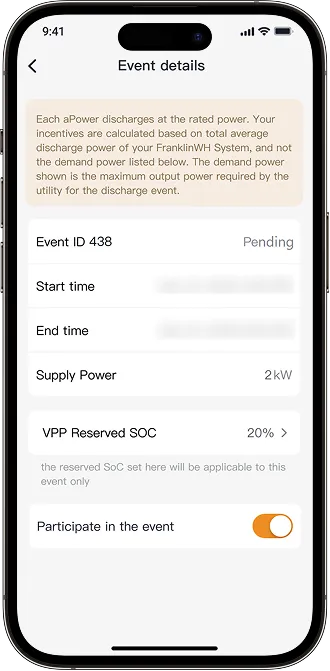
VPP Reserved SOC (Virtual Power Plant Reserved State of Charge) refers to a portion of an aPower battery's charge reserved during a VPP event to ensure the battery can maintain a minimum level of backup power while still providing enough power to backup the home in case of an outage. It ensures that the aPower battery does not fully discharge during the event and is set at a percentage (e.g., 20%), so the aPower battery can still provide power in case of grid disruptions or emergencies. The VPP SOC filter allows homeowners to discharge their batteries below the standard 20% VPP SOC threshold, provided the specific VPP program permits it. For more details, please refer to the guidelines of the applicable VPP program.
The reserved SOC during a VPP event is separate from the operation mode's reserved SOC. For example, in Time of Use mode it may be 25%, while during a VPP event the SOC might be set at 20%. After the VPP event, the system returns to the Time of Use reserved SOC setting of 25%.
How to Set Up
To set up a reserve SOC for VPP events, open the FranklinWH App and follow these steps:
-
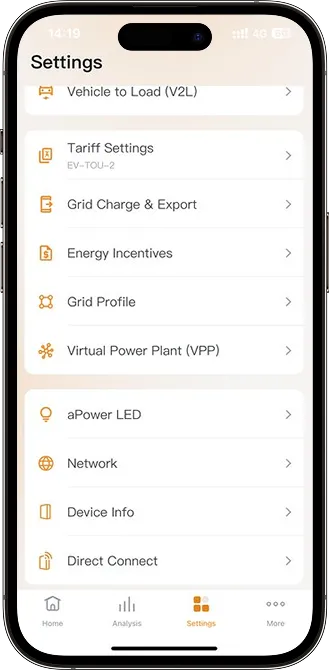
On your energy home screen, tap Settings > Virtual Power Plant (VPP).
-
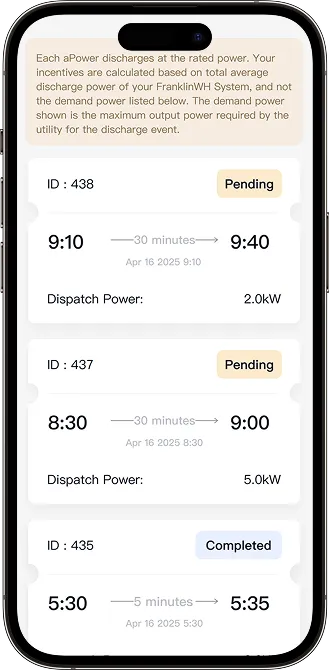
Select the VPP event you have enrolled in with a Pending status to view event details.
- Tap VPP Reserved SOC and set your preferred aPower battery reserve SOC threshold by adjusting the slider on the screen.